The "AI Can't Touch WordPress" Era Is Quietly Ending
WordPress.com's AI agent can now install and update plugins from chat. Here's what that means for self-hosted sites, and how to give AI safe, limited access.
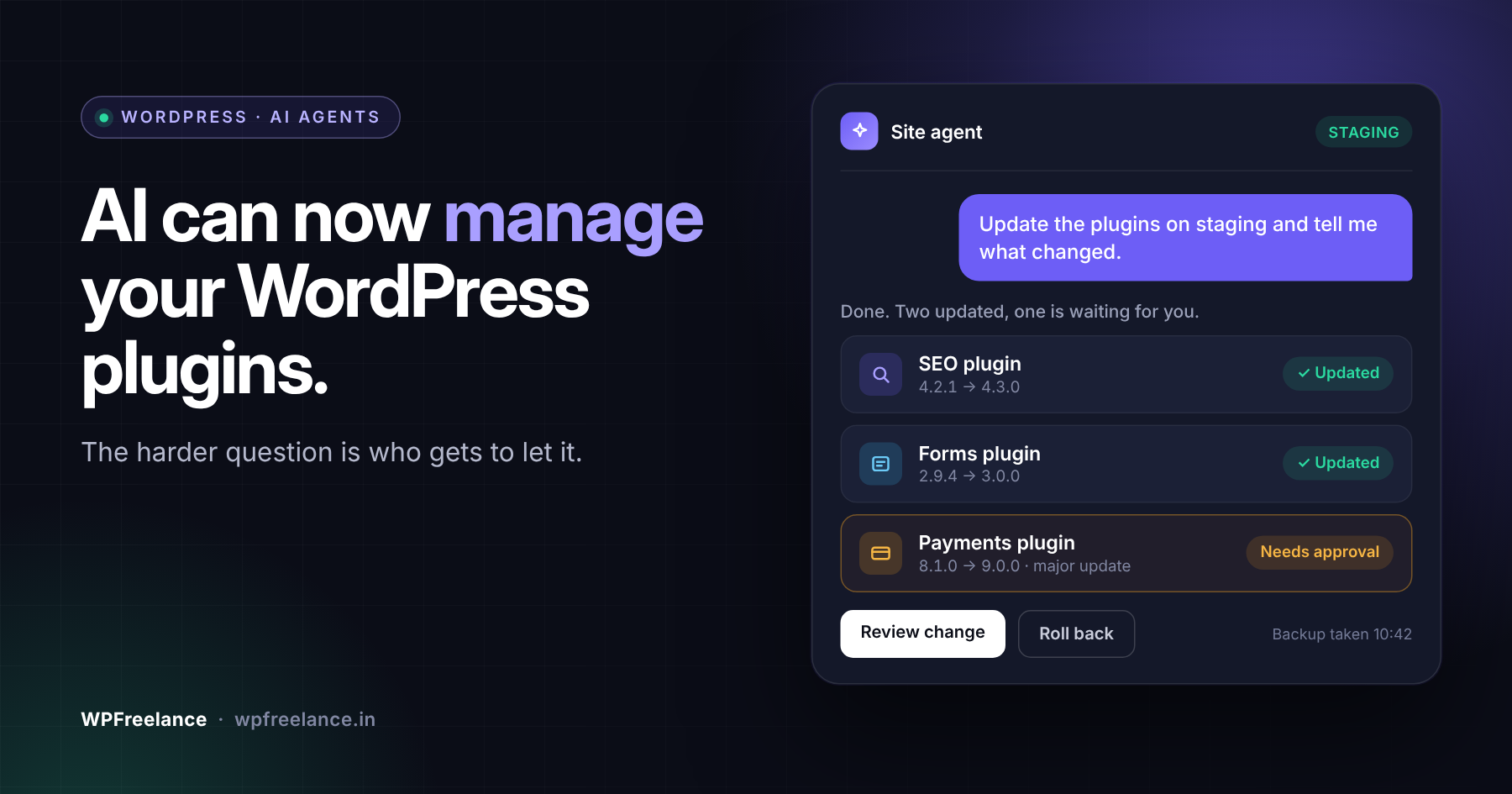
For years the working assumption was simple: AI could write about your WordPress site, but it couldn't touch it. Somebody still had to log in, click Update, and hope nothing broke.
That changed a little on 2 October 2026. Tucked into its latest changelog, WordPress.com said its built-in WordPress Agent can now activate, update, and install plugins straight from a chat window. The same release added a WordPress.com plugin to Cursor's marketplace, so a developer can manage a site from the AI coding tool that's already open on their screen.
On paper that's a convenience feature. We read it differently, and oddly enough it matters most to people who don't use WordPress.com at all.
The short version
- WordPress.com's AI agent can now install, activate, and update plugins from chat, and there's a new Cursor plugin for managing a WordPress.com site from your editor.
- The bigger change is the direction. Running a WordPress site is turning into something software agents can do alongside people.
- On self-hosted or headless WordPress you can build the same thing with the Abilities API, the official MCP Adapter, and WP-CLI. Wiring it up is quick. Deciding what the agent is allowed to do takes longer.
- If you run an agency, sort out permissions and a change process now, before a client's marketing team starts changing plugins by chat.
What did WordPress.com actually ship?
The WordPress.com changelog covers 15 September to 1 October 2026. Most of it is routine, but five items are worth a developer's time.
| Update | What changed | Why it matters |
|---|---|---|
| WordPress Agent knows plugins | You can ask the WordPress Agent to activate, update, and install plugins from chat. | Plugin management is now something an agent can do for you. |
| Cursor plugin | WordPress.com has a plugin in Cursor's marketplace. | Developers can manage a site without leaving their editor. |
| Site logs on cheaper plans | Personal and Premium sites can now see PHP error logs and web server logs. | Small sites get proper debugging instead of guesswork. |
| Block editor update | Gutenberg 24.0.0 changes arrived, including a grid layout and Tab-key indenting in lists. | Small quality-of-life wins for editors. |
| Security releases | WordPress 7.1.1 and 7.1.2 were applied automatically. | Nothing to do on WordPress.com. Elsewhere, check you're up to date. |
The first two rows got the attention. The third is the one small-site owners will actually feel.
Why is the chat feature not the real story?
Asking a chatbot to update a plugin saves you a few clicks, which is nice, but nobody needs an article about that.
What caught our eye is the pattern over the last ten months:
- December 2025: WordPress 6.9 added the Abilities API, a standard way for a site to describe what it can do.
- February 2026: The WordPress Developer Blog published its guide to the official MCP Adapter, which lets AI tools find and use those abilities.
- March 2026: WordPress.com let AI agents write and publish posts.
- October 2026: WordPress.com's agent can install and update plugins.
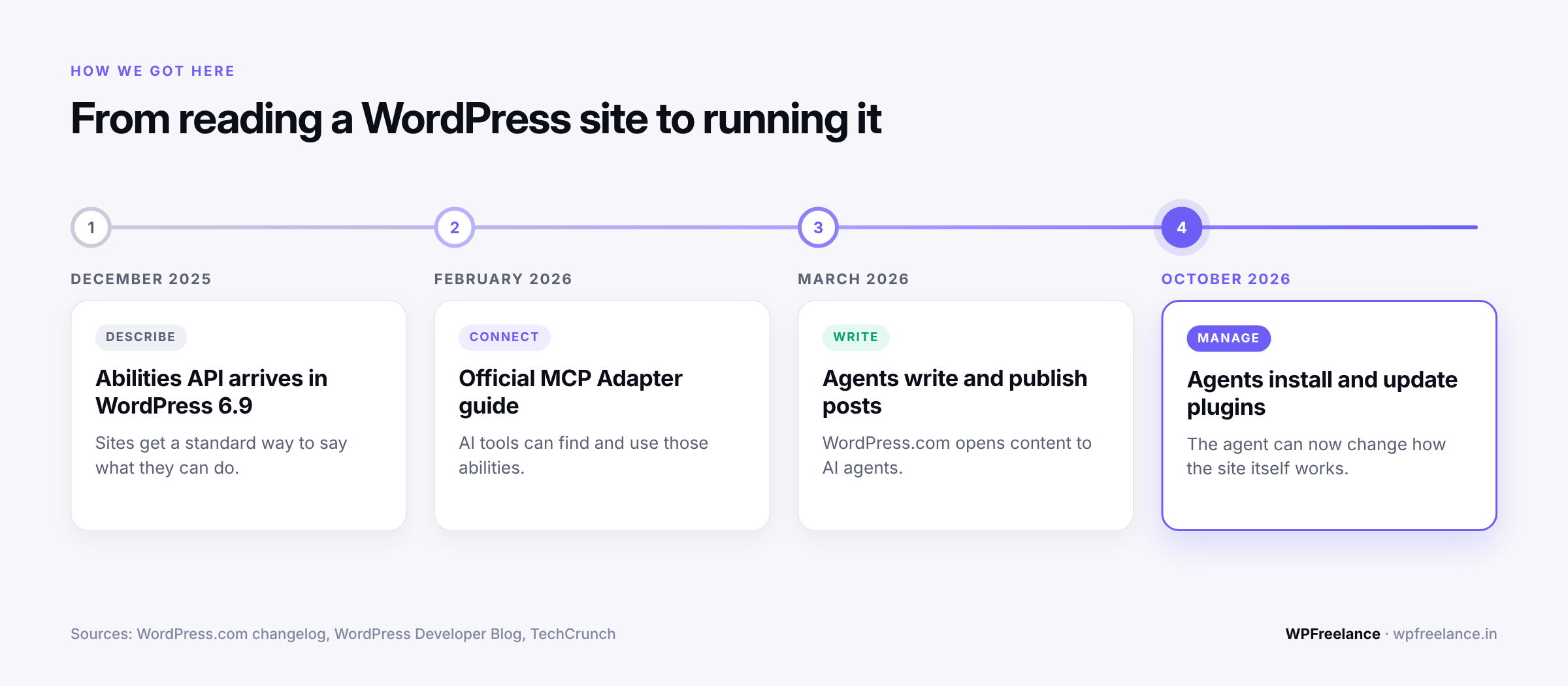
Read that list top to bottom and the agent's reach grows each time. It could read a site, then write content for it, and now it can change how the site itself works.
Plugins are where this gets serious. A blog post is only content, but a plugin is code running on your server, so an agent that installs plugins can change what your site does, how fast it loads, and how exposed it is.
Which leaves a more useful question than "should I try the chat feature?": if agents are going to manage sites, what's my version of that, and who's in control of it?
What is the equivalent for self-hosted and headless WordPress?
There's no ready-made chat box for self-hosted sites, but the parts are already there. You need three of them.
- The Abilities API (WordPress 6.9 and later). An "ability" is one named action your site can perform, with a defined input, a defined output, and a permission check.
- The MCP Adapter. MCP is short for Model Context Protocol. Think of it as a standard plug that lets AI tools such as Claude, Cursor, or VS Code talk to other software. The adapter turns your site's abilities into tools an agent can call.
- WP-CLI. The command-line tool most WordPress developers already live in. The MCP Adapter uses it for local connections.
According to the author of the official MCP Adapter guide, WordPress.com's own agent tools sit on this same foundation. So self-hosted sites aren't behind here. You just have to make more of the decisions yourself.
Headless builds are in the same boat. Your front end might be Next.js or Astro, but plugins, updates, and data still live in the WordPress backend, and that backend is what an agent would be managing.
The mistake to avoid
The shortcut we expect a lot of people to take is handing a general AI agent an admin password or SSH access to the live site and telling it to "handle updates."
Don't. An agent with full admin access can do anything an admin can, including plenty you never meant to ask for.
What works better is a controlled layer: one door into the site, and behind it a short list of things the agent may do.
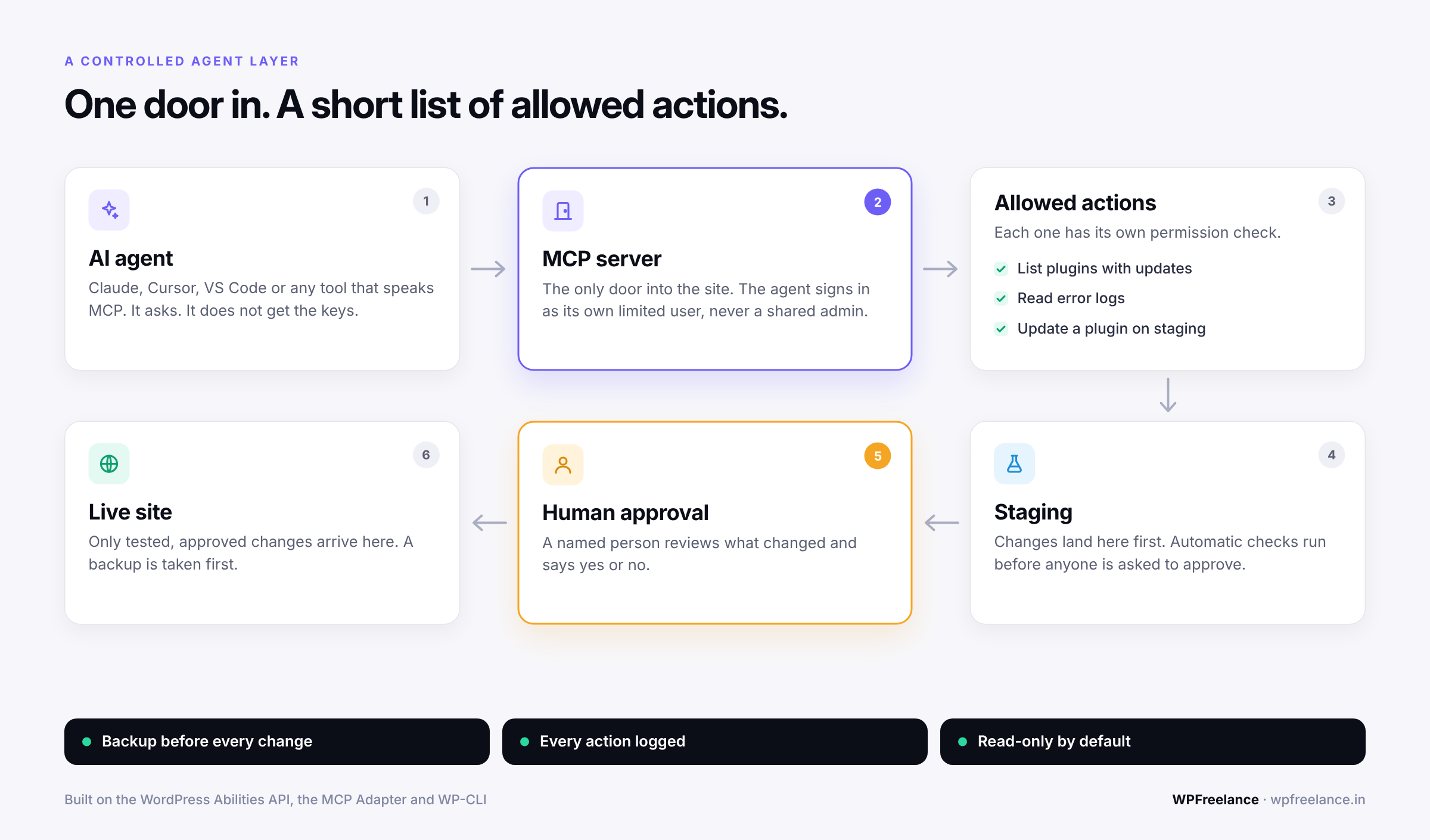
What a controlled agent layer looks like
In practice that comes down to a handful of rules:
- The agent gets its own user with only the capabilities it needs. Never a shared admin login.
- It can only run a short list of named actions, things like "list plugins with updates" or "update this plugin on staging." No raw shell.
- Changes land on staging first, and production changes wait for a human to say yes.
- Anything reachable over the internet starts read-only.
- A backup is taken before every change, and you've actually tested the restore.
- Everything is logged: which agent did what, on which site, and when.
To make that concrete, here's a simplified read-only ability. It tells an agent which plugins have updates waiting, and that's all it does.
// 1. Abilities need a category, so register one first.
add_action( 'wp_abilities_api_categories_init', function () {
    wp_register_ability_category( 'site-maintenance', array(
        'label'       => 'Site maintenance',
        'description' => 'Abilities for checking and maintaining the site.',
    ) );
} );

// 2. Register the ability itself.
add_action( 'wp_abilities_api_init', function () {
    wp_register_ability( 'agency/list-plugin-updates', array(
        'label'               => 'List plugin updates',
        'description'         => 'Returns the plugins that have an update available. Read-only.',
        'category'            => 'site-maintenance',
        'output_schema'       => array(
            'type'  => 'array',
            'items' => array( 'type' => 'string' ),
        ),
        'permission_callback' => function () {
            return current_user_can( 'update_plugins' );
        },
        'execute_callback'    => function () {
            $updates = get_site_transient( 'update_plugins' );
            return array_keys( (array) ( $updates->response ?? array() ) );
        },
        'meta'                => array(
            'annotations' => array( 'readonly' => true, 'destructive' => false ),
            'mcp'         => array( 'public' => true ), // visible to the MCP Adapter
        ),
    ) );
} );
For an ability that changes something, the permission check is where the guardrail goes. This one lets the agent update plugins on staging and refuses everywhere else:
'permission_callback' => function () {
    // Writes are allowed on staging only. Production goes through a human.
    return current_user_can( 'update_plugins' )
        && 'staging' === wp_get_environment_type();
},
Treat both snippets as a starting point, and check the current Abilities API docs before you ship anything. Underneath, the safe update routine is the one careful developers have followed for years, whoever (or whatever) is running it:
wp plugin list --update=available        # 1. see what is pending
wp db export before-update.sql           # 2. take a backup
wp plugin update woocommerce --dry-run   # 3. preview the change
wp plugin update woocommerce             # 4. apply on staging, then test
An agent doesn't change that routine. It just gets through it faster, within the limits you've set.
Not sure what your plugins are doing to your site today? Our free audit is a manual review of your site speed, heavy plugins, and checkout flow. You get a prioritised fix list within 48 hours. Get your free website audit →
Why do agencies need permissions and change governance now?
Until now, changing a plugin took someone who knew where the Plugins screen was and was slightly scared of it. That nervousness was useful, because it kept casual changes off client sites.
Chat takes the nervousness away. Picture Ananya, who runs marketing for an online store. At 11 pm she asks the site's AI agent to "add a popup plugin for the Diwali sale." The agent picks one, installs it, and switches it on. Nobody checked whether the plugin is still maintained, whether it slows the page down, or whether it clashes with the Razorpay checkout. By morning orders are down and no one can say why.
The AI did exactly what it was asked, so you can't really blame it. What was missing was a process around it.
Once "AI manages plugins" is normal, people who aren't developers will be changing client sites, and agencies that have planned for it will have a much quieter 2027. The way we think about it is three levels: Look, Try, Ship.
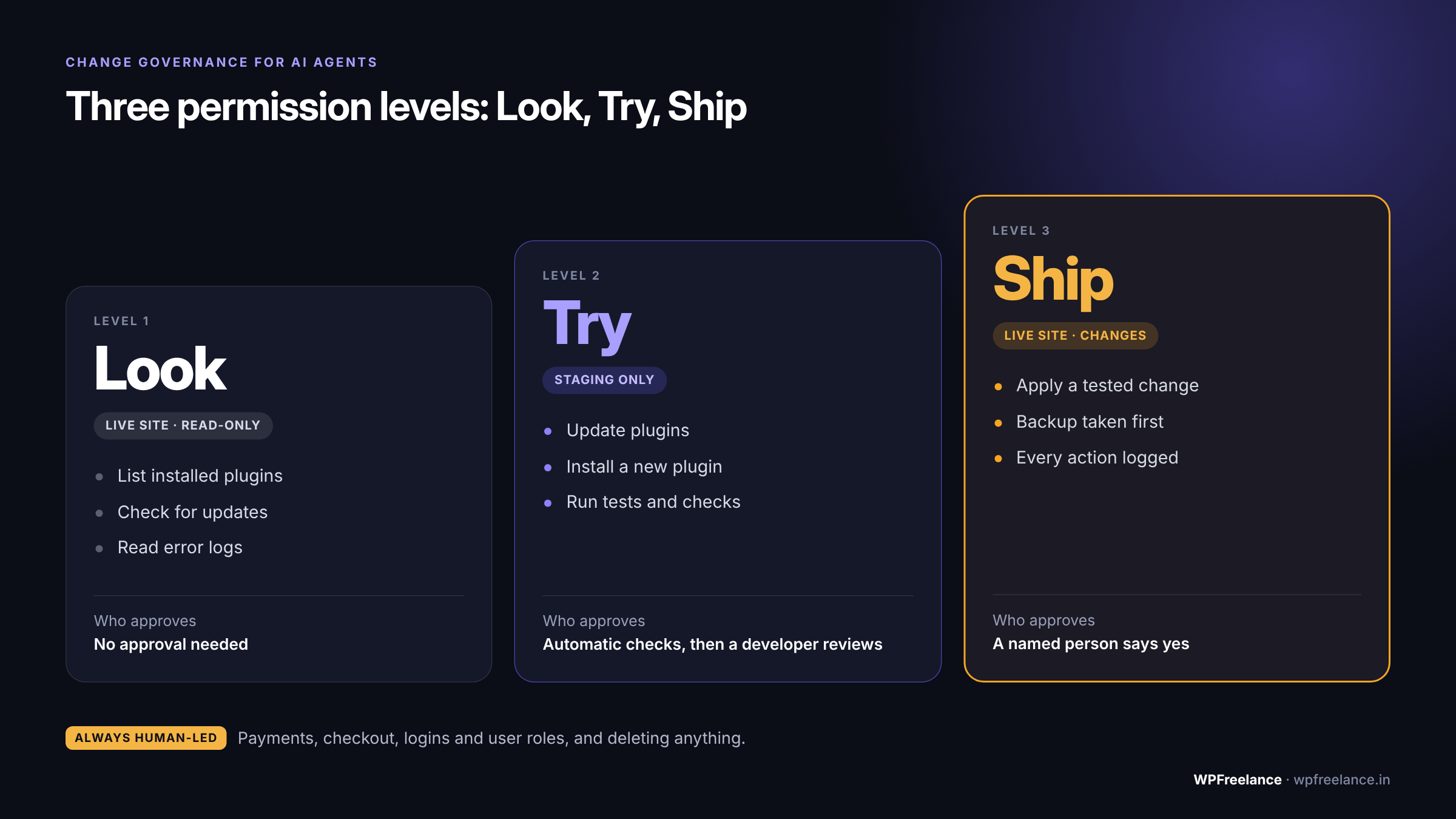
| Level | What the agent can do | Where | Who approves |
|---|---|---|---|
| Look | List plugins, check for updates, read error logs | Production, read-only | No approval needed |
| Try | Update plugins, install a new plugin, run tests | Staging only | Automatic checks, then a developer reviews |
| Ship | Apply a tested change to the live site | Production | A named person approves, with a backup taken first |
A few things stay human-led at every level: payments, checkout, logins and user roles, and deleting anything.
It's the same rule we already apply to AI coding work. We use Claude Code and Cursor in our own builds, and as we wrote in Running Claude Code in Production, the agent can prepare the change but a human owns the decision to ship it. That's also why AI-assisted development only speeds delivery up when review stays in place.
For every client, we'd put three things in writing:
- Who may ask an agent to change the site. Names, not just roles.
- How a new plugin gets vetted. Is it still maintained? Does it overlap with something already installed? Our list of the best WordPress plugins in 2026 is a reasonable shortlist to start from.
- Where the change log lives. When a site breaks, "what changed, and who asked for it?" should take under a minute to answer.
If you already sell WordPress maintenance, add this to your service description. Sooner or later a client is going to ask who's allowed to let AI change their site, and it's better to have an answer before they do.
The small win: site logs on cheaper plans
One quieter item is worth a mention. WordPress.com's Personal and Premium plans can now see their own PHP error logs and web server logs. The more detailed monitoring, performance, and deployment logs are still reserved for Business and Commerce.
For small-client work that's a real improvement. "The site shows a white screen and I have no idea why" becomes a five-minute fix once you can read the error, and an AI agent has something real to go on when you ask it what went wrong.
If your current host hides logs or puts them behind a support ticket, keep that in mind next time you compare options. Our guides to the best WordPress hosting in India and cloud vs shared hosting cover what to look for.
What should you do this week?
You don't have to build an agent setup today, but it's worth being ready for one.
- List every admin on each site and remove the ones nobody recognises.
- Create a separate, limited user for any AI tool or automation. No shared logins.
- Set up staging if you don't have it. Without staging there's nowhere safe for an agent to try things.
- Test a backup restore. Plenty of backups have never been restored even once.
- Turn on activity logging so every plugin change has a name and a time next to it.
- Write a one-page change policy based on Look, Try, Ship, and share it with your team and your clients.
None of this is new advice, to be fair. It's the housekeeping most of us already know we should be doing, and agents just make it harder to put off. It also protects you from ordinary human mistakes, which haven't gone anywhere.
Would you rather hand this over? Our care plans cover updates, backups, security monitoring, and uptime checks, with a senior engineer reviewing every change. Book a call →
FAQ
Can AI agents install WordPress plugins now?
Yes. As of the 2 October 2026 changelog, the WordPress Agent on WordPress.com can activate, update, and install plugins from chat. On self-hosted WordPress you can give an agent similar abilities with the Abilities API and the MCP Adapter, but you'll have to set it up and define the limits yourself.
Is it safe to let an AI agent update plugins on a live site?
Only with guardrails. Let the agent update plugins on staging, run your checks, and have a person approve the change before it reaches the live site. Take a backup first, every time. An agent with unrestricted admin access to production isn't a safe setup.
What is an MCP server in WordPress?
MCP stands for Model Context Protocol, a standard way for AI tools to connect to other software. A WordPress MCP server exposes a list of actions, called abilities, that an AI agent such as Claude or Cursor is allowed to discover and run on your site.
Does this work with headless WordPress?
Yes. In a headless setup the front end is separate, but plugins, content, and data still live in the WordPress backend. An agent connects to that backend the same way, and the same permission rules apply.
Do I need Cursor or WordPress.com to use AI agents with WordPress?
No. The Cursor plugin in this release is for WordPress.com sites. Self-hosted sites can connect Claude Desktop, Claude Code, Cursor, or VS Code through the official MCP Adapter.
Will AI agents replace WordPress maintenance services?
No, but they do change what the work looks like. Clicking Update gets faster. Someone still has to decide what's allowed, check the site works afterwards, and take responsibility when it doesn't, and that judgement is what clients are paying for.
Sources
- WordPress.com Changelog: Your Growing AI Toolbox, WordPress.com, 2 October 2026
- From Abilities to AI Agents: Introducing the WordPress MCP Adapter, WordPress Developer Blog, 4 February 2026
- WordPress.com now lets AI agents write and publish posts, and more, TechCrunch, 20 March 2026
- Gutenberg 24.0.0 release notes, GitHub
- WordPress MCP Adapter, GitHub
Planning a website or store?
We design, build, and maintain fast, well-engineered sites. Tell us what you need and we'll come back with a clear plan.
Talk to WPFreelance →