Headless WooCommerce and Conversions: Does Faster Actually Sell More?
What headless WooCommerce really is, why it loads faster, how speed maps to revenue — and when it's actually worth the switch.
If your WooCommerce store feels sluggish on mobile, you're not imagining it — and it's quietly costing you sales. The moment a product page takes more than a couple of seconds to become interactive, a meaningful slice of shoppers leave before they ever see your Add to Cart button.
"Going headless" is one of the most reliable ways to fix that. But it's often explained in vague, hype-heavy terms. So let's be concrete: what headless WooCommerce actually is, why it loads faster, how that maps to revenue, and — just as important — when it isn't worth the effort.
What "headless" actually means
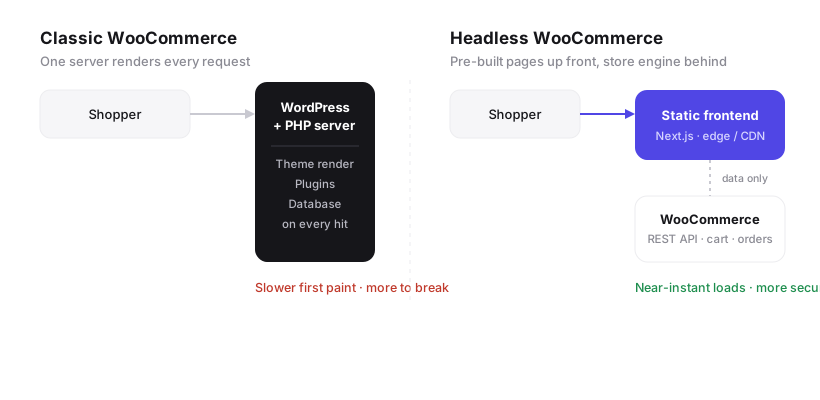
A classic WordPress store does everything in one place. Every time a shopper opens a page, a single PHP server boots WordPress, runs your theme and plugins, queries the database, and assembles the HTML — on the spot, for every visit.
Headless splits that job in two:
- The front end (what customers see) is rebuilt as a fast, modern site — for example Next.js — and served as pre-built pages from a global CDN.
- The back end stays WooCommerce. It keeps running your catalog, cart, orders, and payments, and hands data to the front end through the WooCommerce REST API.
You keep the WooCommerce admin your team already knows. You just stop making shoppers wait for a server to render every page from scratch.
New to the concept? Start with the primer — What Is Headless WooCommerce & Why It's Fast. Worried about your team's workflow? See Go Headless Without Losing WordPress. This article stays focused on one question: does the speed actually pay off?
Why headless loads faster
Speed isn't magic here — it's a shorter critical path. Three concrete reasons:
- Pages are pre-built, not rendered on demand. Most of the page is already HTML sitting on a CDN near your customer. There's no per-request PHP, theme, or plugin work to wait for.
- The database is off the hot path. In a classic store, a traffic spike hammers the database and everything slows down together. Headless serves cached pages instantly and talks to WooCommerce only for the dynamic bits (stock, cart, checkout).
- You ship far less code. A typical WordPress theme drags in plugin CSS and JavaScript on every page. A purpose-built front end ships only what the page needs, so it becomes interactive sooner.
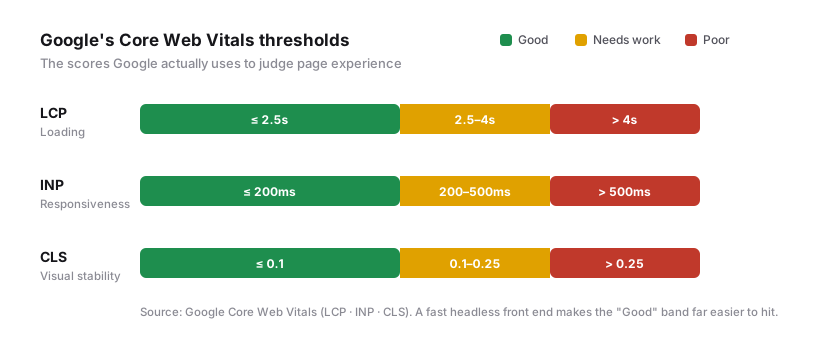
The payoff shows up directly in Core Web Vitals — the page-experience scores Google actually uses.
Why speed maps to revenue
Faster pages help in two compounding ways.
Rankings. Core Web Vitals are a real ranking signal, and speed shapes how much of your site Google crawls. Faster, more stable pages are simply easier to rank.
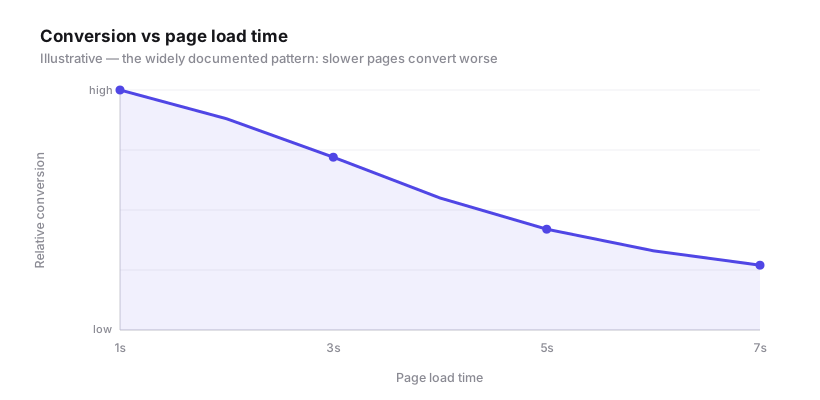
Conversion. This is the one that pays the bills. Across ecommerce, the relationship is consistent and well documented: as pages get slower, conversion falls and bounce rates climb. Every second of delay is shoppers deciding it isn't worth the wait.
A simple way to model the ROI
You don't need perfect data to sanity-check a rebuild — just your own numbers. Take your current monthly store visits, your conversion rate, and your average order value:
Monthly revenue = visits × conversion rate × average order value
Now model a conservative lift. If a faster storefront nudges your conversion rate from 1.8% to 2.2% on 40,000 monthly visits at a ₹2,500 average order value, that's roughly ₹40,000 in extra revenue a month — before you count better ad efficiency and repeat purchases. Run the same math with your figures and a modest lift, and you'll quickly see whether the build pays back in months or in years. That break-even number, not the speed score, is what should drive the decision.
Classic vs headless at a glance
| Classic WooCommerce | Headless WooCommerce | |
|---|---|---|
| Page delivery | Rendered per request (PHP) | Pre-built, served from the edge |
| Typical speed | Slower first paint | Near-instant loads |
| Handles traffic spikes | Database strains | CDN absorbs the load |
| WooCommerce admin | Yes | Yes (unchanged) |
| Front-end flexibility | Theme-bound | Fully custom |
| Security surface | Larger (public PHP) | Smaller (static front) |
| Best for | Small/simple stores | Growth-focused stores |
When headless isn't worth it
Headless is a serious upgrade, not a default. Be honest about the trade-offs:
- Very small or brand-new stores. If you have a handful of products and little traffic, a well-tuned classic WooCommerce site (good hosting, caching, a lean theme) may be plenty. Fix the basics first.
- Heavy reliance on page-builder plugins. If your store leans on Elementor or a pile of front-end plugins, those don't carry over as-is; the front end is rebuilt.
- No appetite for a modern stack. Headless adds a build-and-deploy workflow. It's worth it for stores where speed drives revenue — less so if the site rarely changes.
If your store is growing and speed is holding it back, though, headless is often the highest-leverage change you can make. See how we've done it for other stores.
How we build headless WooCommerce
Our approach at WPFreelance is deliberately low-risk:
- Keep WooCommerce as the engine. Your catalog, orders, and payments stay put — no risky data migration of the core store.
- Rebuild the front end for speed. A custom, statically-optimised site with instant navigation and a clean, focused path to checkout.
- Protect SEO through the switch. URLs, redirects, metadata, and structured data are mapped carefully so rankings carry over.
- Deploy on a global edge so pages are fast everywhere, and we maintain it after launch.
FAQ
What is headless WooCommerce?
It's a setup where WooCommerce continues to run your store's catalog, cart, orders, and payments, while a separate, faster front end (such as Next.js) delivers the pages customers see and pulls data from WooCommerce via its REST API.
Does going headless hurt SEO?
It shouldn't — done properly, it usually helps. Faster pages and better Core Web Vitals aid ranking. The one rule: migrate URLs, redirects, metadata, and structured data carefully so you keep the equity you've already earned.
Do I lose the WordPress admin?
No. Your team keeps managing products, orders, and content in the same WooCommerce dashboard. Only the customer-facing front end changes.
Is headless more expensive?
There's more upfront engineering than installing a theme, so it costs more to build. For stores where speed drives sales, the return in conversions and lower maintenance risk usually more than covers it. For very small stores, it may not be worth it yet.
How long does a migration take?
It depends on catalog size and how much custom functionality you have, but most stores move over in a few weeks, with the live store running untouched until the new front end is ready to switch on.
The bottom line
Headless WooCommerce keeps the commerce engine you trust and replaces the slow part — rendering every page on demand — with pre-built pages served from the edge. For a growing store, that means faster loads, better Core Web Vitals, and a fairer shot at converting the traffic you already have.
Thinking about a headless rebuild, or just want a straight answer on whether it's right for your store? Talk to WPFreelance — we'll tell you honestly whether it's worth it.
Planning a website or store?
We design, build, and maintain fast, well-engineered sites. Tell us what you need and we'll come back with a clear plan.
Talk to WPFreelance →